

Welcome to the series of How To:Quality. Your 3 min guide on how Quality Professionals address various business needs to drive Improvement and Governance.
A lot of the work we do is projectised. Regardless of the time it takes, it has a start and an end date is how a project is defined by Project Management Institute. If it does not, it is deemed an operational task. Plenty of project management tools are out there in the market and I use Asana.
WIth 10 years of using Asana as the project / portfolio management tool with many teams across the globe, over 100 projects, and working with over 20 different senior leaders (aka sponsors), I see the added value this tool brings. In this post, I will share how you can deploy project management principles using a tool like Asana, highlighting the Stakeholders Domain.
How to: Quality
Deploying project management principle swith Asana
I follow the Project Management Book of Knowledge (PMBOK) by the Project Management Institute (PMI). I won’t share the different approaches to project management, but I will talk about the domains or knowledge areas (older PMBOK guides), and managing a project on Asana, makes it really easy to cover all those domains.
Grab your coffee  and hopefully(?!) enjoy!
These are the domains you need to be mindful of when managing a project:
- Stakeholders
- Team
- Development Approach
- Planning
- Project Work
- Delivery
- Measurement
- Uncertainty
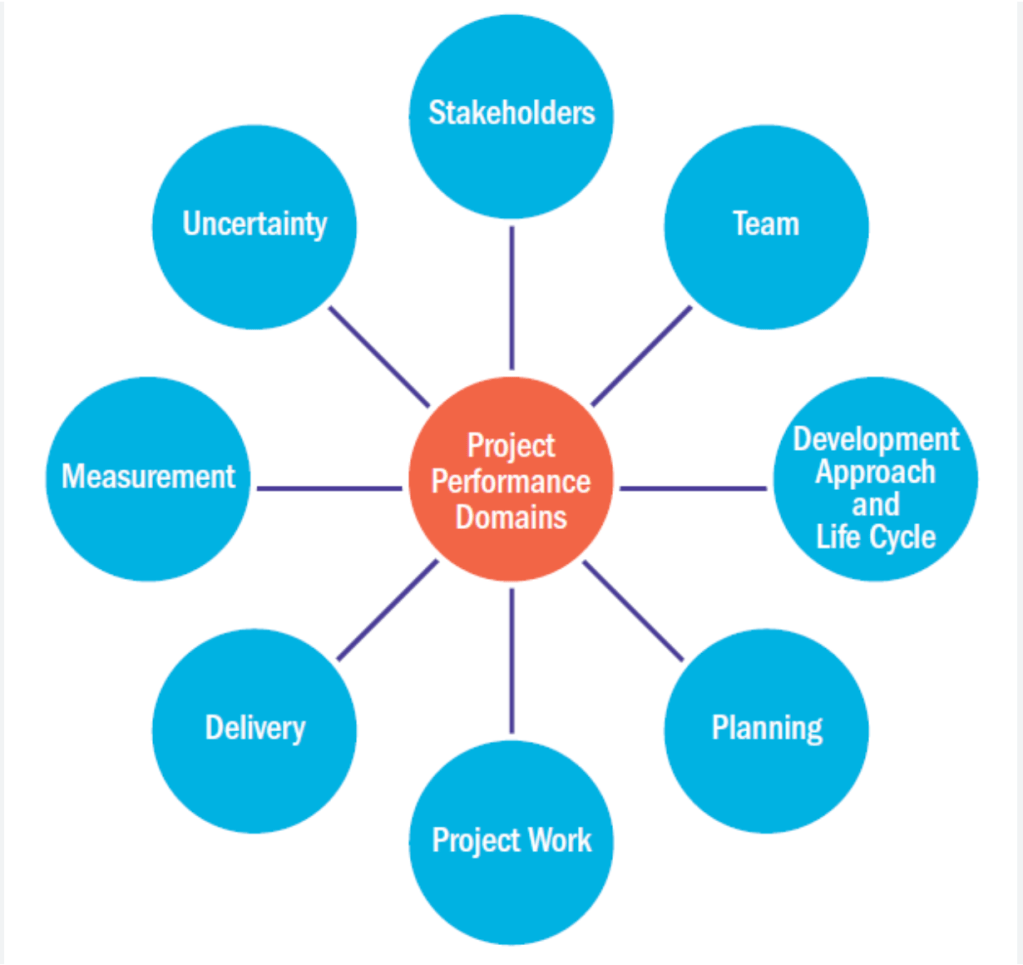
So how can Asana help you adhere to your project management domains for a better successful outcome? Let’s talk Stakeholders.
Stakeholders
With stakeholder management, you need to consider the following activities:
- Identifying stakeholders
- Gathering Stakeholders’ Expectations
- Managing Stakeholders
Identifying Stakeholders:
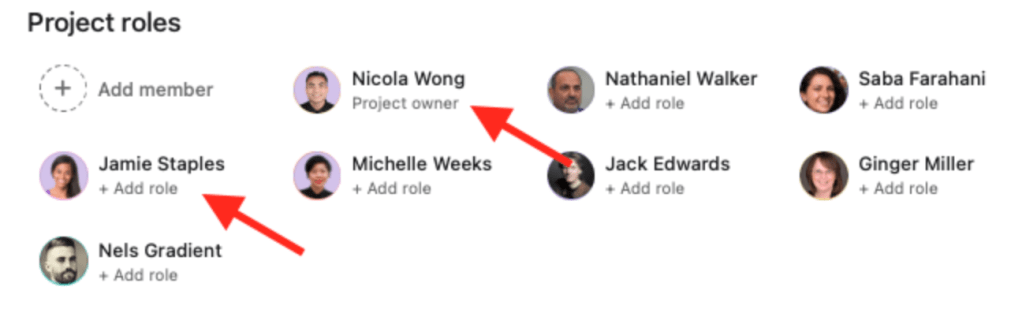
If you run exploration meetings with your team at the start of the project, or if you are given your stakeholders at the start of the project, Asana overview tab in projects allows you to add the project stakeholders and identify their roles. This is very helpful for the life of the project, especially if the team grows/evolves with the life of the project
Gathering Stakeholders’ Expectations:
Understanding their expectations spans from what they expect the outcome of the project to be to their expectations from the communication of status updates and risk escalation. Depending on the size of your stakeholders, you can either use:
- Forms: These help you ask specific questions, and your stakeholders will submit their details. The responses will be captured in tasks within the project space itself. If the project has many stakeholders, I would suggest creating a project for stakeholders where you use it as a reference and keep a record of all expectations.
- Assign tasks to the stakeholders. Use custom fields and questions in descriptions for them to populate. This will be stored directly in the project space and easy for you to work with.
- Managing Stakeholders: The most effective way to do so is through the status update feature that is embedded within the project. You can now also access ‘draft with AI’ feature for a more efficient process. The status update allows you to provide information on what was achieved, what’s blocked and what is next in the plan.
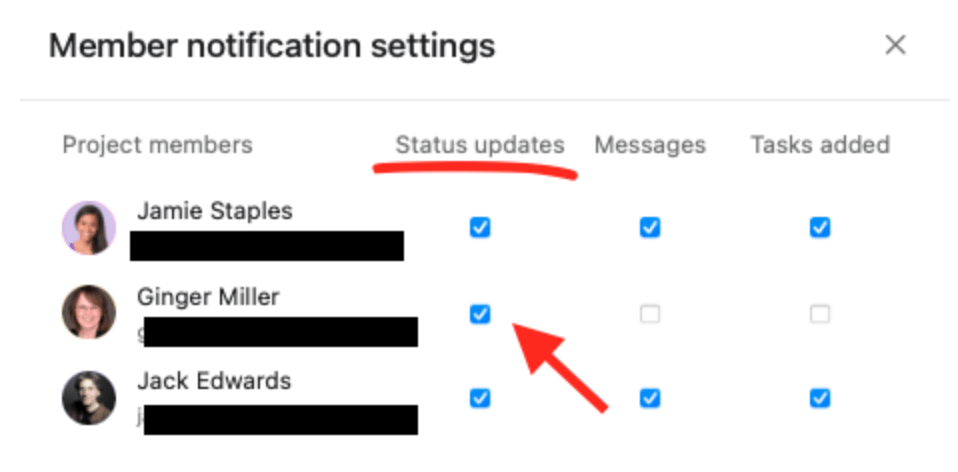
 if your stakeholders are only interested in being informed, make sure you go to project permissions and notifications and untick all types of notifications for these stakeholders except for status updates. In the example below, Ginger is a stakeholder who only needs to be informed of the status update.
If your project has risks identified, make sure you communicate the risk with relevant stakeholders before you issue the status update. So, for example, if someone needs to be informed first, add them as a collaborator to the ‘risk’ task for a heads-up before you issue your status update to the entire audience. Why? This strenghtens your relation with this stakeholder and opens up further collaboration.
If you are interested in finding out more about what these Asana features can do, here are the links to their section from the guide:
- Project Views: https://help.asana.com/hc/en-us/articles/23069999724955-Project-customization-and-views#h_01HQ133RKQFPQWKMFQSKM15WJ1
- Forms: https://help.asana.com/hc/en-us/articles/14111033233947-Forms
- Status updates: https://help.asana.com/hc/en-us/articles/14148168179099-Project-progress-and-status-updates
- Custom fields: https://help.asana.com/hc/en-us/articles/14110099577883-Custom-fields
I hope you have enjoyed your coffee. Any specific domain you are interested in me exploring next, please let me know. If you use a different project management tool which is super beneficial to your projects, please get in touch and share your story.
If you enjoyed this How To scenario, why not follow me for other scenarios dropping straight into your inbox 👇
If you would like to see a particular topic covered in this series, please get in touch and let me know the topic or scenario, and I will do my best to help. You can get in touch on your preferred platform 👇

 the Quality strategy
Leave a comment